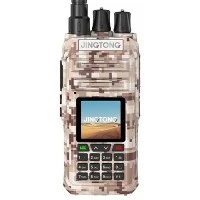

How to use a UHF VHF handheld ham radio for PSK31 communication?
As a supplier of UHF VHF handheld ham radios, I am often asked about the process of using these devices for PSK31 communication. PSK31, or Phase Shift Keying 31, is a popular digital mode in amateur radio that offers efficient and reliable communication, especially in challenging conditions. In this blog, I will guide you through the steps of using a UHF VHF handheld ham radio for PSK31 communication.
Understanding PSK31
PSK31 is a digital communication mode that uses phase shift keying to transmit data at a relatively slow rate of 31.25 baud. It is known for its excellent performance in weak signal conditions, making it a favorite among amateur radio operators. The simplicity of PSK31, combined with its ability to provide clear and reliable communication, has contributed to its widespread use.
Equipment Requirements
To use a UHF VHF handheld ham radio for PSK31 communication, you will need the following equipment:
- UHF VHF Handheld Ham Radio: A high - quality handheld radio capable of operating in the UHF and VHF bands. You can find a wide range of suitable radios on our website at UHF VHF Handheld Ham Radio.
- Computer or Mobile Device: You will need a computer or a mobile device with software that can decode and encode PSK31 signals. Popular software options include fldigi, which is available for both Windows and Linux systems.
- Sound Card Interface: A sound card interface is required to connect the radio to the computer or mobile device. This interface allows the audio signals from the radio to be processed by the software.
- Antenna: A good quality antenna is essential for effective communication. Make sure your antenna is properly tuned to the frequency you plan to use for PSK31 communication.
Setting Up the Equipment
- Connect the Radio to the Computer: Use the sound card interface to connect the radio to the computer. Make sure the connections are secure and that the audio levels are properly adjusted.
- Install the PSK31 Software: Download and install the PSK31 software on your computer or mobile device. Follow the installation instructions provided by the software manufacturer.
- Configure the Software: Open the PSK31 software and configure it to work with your radio. You will need to set the frequency, mode, and other parameters according to your radio's specifications.
- Tune the Radio: Tune your UHF VHF handheld ham radio to the frequency where you want to communicate. You can use the radio's built - in tuning controls or the software to adjust the frequency.
Making a PSK31 Contact
- Listen for Signals: Before transmitting, listen to the frequency to make sure it is clear. You can use the software to monitor the frequency and look for PSK31 signals.
- Call CQ: If the frequency is clear, you can start by calling CQ. This is a standard way of announcing your presence on the frequency and inviting other operators to make contact. Type "CQ" in the software's transmit window and press the transmit button on your radio.
- Respond to Calls: If another operator responds to your CQ, you can start a conversation. Use the software to type your messages, and the radio to transmit them. Make sure to follow the proper radio etiquette, such as waiting for the other operator to finish speaking before transmitting.
- Exchange Information: During the contact, you can exchange information such as your call sign, location, and any other relevant details. Keep the conversation friendly and respectful.
Tips for Successful PSK31 Communication
- Use a Good Antenna: A good antenna can significantly improve the quality of your communication. Make sure your antenna is properly installed and tuned.
- Keep the Audio Levels in Check: Adjust the audio levels on your radio and software to ensure clear communication. Too high or too low audio levels can cause problems.
- Practice Regularly: The more you practice using PSK31, the better you will become at it. Try to make contacts with other operators regularly to improve your skills.
- Join a Community: There are many amateur radio communities and forums where you can learn from other operators and share your experiences. Joining a community can be a great way to improve your knowledge and skills.
Using Bluetooth for Enhanced Connectivity
In addition to the traditional setup, you may also consider using a Bluetooth Two Way Radio for enhanced connectivity. Bluetooth technology allows you to connect your radio to your computer or mobile device wirelessly, providing greater flexibility and convenience.
Other Considerations
When using a UHF VHF handheld ham radio for PSK31 communication, it is important to be aware of the regulations and licensing requirements in your area. Make sure you have the necessary license to operate the radio and that you comply with all relevant rules and regulations.
If you are new to amateur radio, you may also want to consider taking a training course or joining a local amateur radio club. These resources can provide you with valuable information and support as you learn to use your radio.
Conclusion
Using a UHF VHF handheld ham radio for PSK31 communication can be a rewarding experience. With the right equipment, proper setup, and some practice, you can enjoy clear and reliable communication with other amateur radio operators around the world.


If you are interested in purchasing a UHF VHF handheld ham radio or any other related equipment, please feel free to visit our website at UHF VHF Handheld Ham Radio or Analog Handheld Radio. We are always ready to assist you with your purchasing needs and provide you with the best products and services.
References
- ARRL Handbook for Radio Communications. American Radio Relay League.
- "The Complete Guide to PSK31" by Joe Taylor, K1JT.