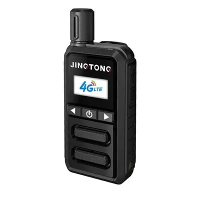

In the dynamic world of communication technology, Smart Poc Radios have emerged as a game - changer, offering seamless and efficient communication solutions for various industries. As a dedicated Smart Poc Radio supplier, I understand the importance of ensuring that these devices are properly charged to maintain their optimal performance. In this blog, I'll share some comprehensive insights on how to charge Smart Poc Radios effectively.
Understanding the Battery of Smart Poc Radio
Before delving into the charging process, it's essential to understand the type of battery used in Smart Poc Radios. Most Smart Poc Radios are equipped with lithium - ion (Li - ion) batteries. These batteries are popular due to their high energy density, long lifespan, and low self - discharge rate. However, they also require careful handling during the charging process to ensure safety and longevity.
Choosing the Right Charger
The first step in charging a Smart Poc Radio is to select the appropriate charger. Using an incorrect charger can not only damage the battery but also pose a safety risk. Our company provides chargers specifically designed for our Smart Poc Radios. These chargers are engineered to deliver the correct voltage and current to the battery, ensuring a safe and efficient charging process.
It's important to note that using third - party chargers may void the warranty of the Smart Poc Radio. So, it's always recommended to use the charger provided by the manufacturer. If you need a replacement charger, you can contact our customer service team for assistance.
Charging the Smart Poc Radio
Once you have the right charger, follow these steps to charge your Smart Poc Radio:


-
Prepare the Charger and the Radio: First, ensure that the charger is plugged into a reliable power source. Make sure the power outlet is functioning properly and can provide a stable electrical supply. Then, turn off the Smart Poc Radio before connecting it to the charger. This helps to prevent any potential electrical issues and also allows the battery to charge more efficiently.
-
Connect the Radio to the Charger: Locate the charging port on the Smart Poc Radio. It is usually located at the bottom or the side of the device. Gently insert the charging cable into the port until it fits snugly. You may hear a click sound, indicating a proper connection.
-
Monitor the Charging Process: Once the radio is connected to the charger, you will notice that the charging indicator light on the radio or the charger will turn on. This light may change color to indicate the charging status. For example, it may be red when the battery is low and charging, and turn green when the battery is fully charged.
It's important to monitor the charging process and avoid overcharging the battery. Overcharging can reduce the battery's lifespan and may even cause damage to the battery and the device. Most modern Smart Poc Radios are equipped with over - charge protection features, but it's still a good practice to unplug the charger once the battery is fully charged.
Charging in Different Situations
Charging at Home or Office
When charging your Smart Poc Radio at home or in the office, you can use a standard wall charger. Simply plug the charger into a wall outlet and connect the radio to the charger. Make sure to place the radio in a well - ventilated area during the charging process to prevent overheating.
Charging on the Go
For those who are constantly on the move, there are several options for charging Smart Poc Radios. You can use a portable power bank. Make sure the power bank has enough capacity to charge the radio. Connect the radio to the power bank using the charging cable, and the radio will start charging.
Another option is to use a car charger. If you are traveling in a car, you can plug the car charger into the vehicle's cigarette lighter socket and connect the radio to the charger. This allows you to charge the radio while on the road.
Maintaining the Battery Health
To ensure the long - term performance of your Smart Poc Radio's battery, it's important to follow some battery maintenance tips:
-
Avoid Extreme Temperatures: Lithium - ion batteries are sensitive to extreme temperatures. Avoid exposing the radio to high temperatures, such as leaving it in a hot car, as this can damage the battery. Similarly, very low temperatures can also affect the battery's performance.
-
Regularly Discharge and Recharge: It's a good practice to regularly discharge and recharge the battery. However, avoid completely draining the battery before recharging, as this can also reduce the battery's lifespan. Aim to keep the battery level between 20% and 80% for optimal performance.
-
Store the Radio Properly: If you need to store the Smart Poc Radio for an extended period, make sure the battery is charged to about 50%. Store the radio in a cool, dry place.
Our Product Range
As a Smart Poc Radio supplier, we offer a wide range of products to meet different customer needs. Our Mini Poc Radio is a compact and lightweight option, perfect for those who need a portable communication device. The Poc 4g provides high - speed data transmission and reliable communication, making it suitable for various industries. And our Lte Poc offers advanced features and excellent performance.
Contact Us for Purchase
If you are interested in our Smart Poc Radios or have any questions about charging or other aspects, we encourage you to contact us for a purchase negotiation. Our team of experts is ready to provide you with detailed information and support to help you make the best choice for your communication needs.
References
- Battery University: A comprehensive resource for battery - related knowledge, including lithium - ion battery charging and maintenance.
- Manufacturer's user manuals for Smart Poc Radios, which provide detailed instructions on charging and battery care.